
SIMT 2 at a glance
SIMT 2 is the largest update in the app's history. It touches every layer of the product: a complete visual redesign, a new automation engine, new compass views, deeper target management, a dedicated moon phase experience, and a long list of stability and performance improvements.
This post walks through each feature in the SIMT 2 release in detail, explains how the pieces fit together, and answers the most common questions about the update.
The Cosmos redesign: a window into warm deep space
You are the center of your universe. Turn your body, and the cosmos behind every screen turns with you.
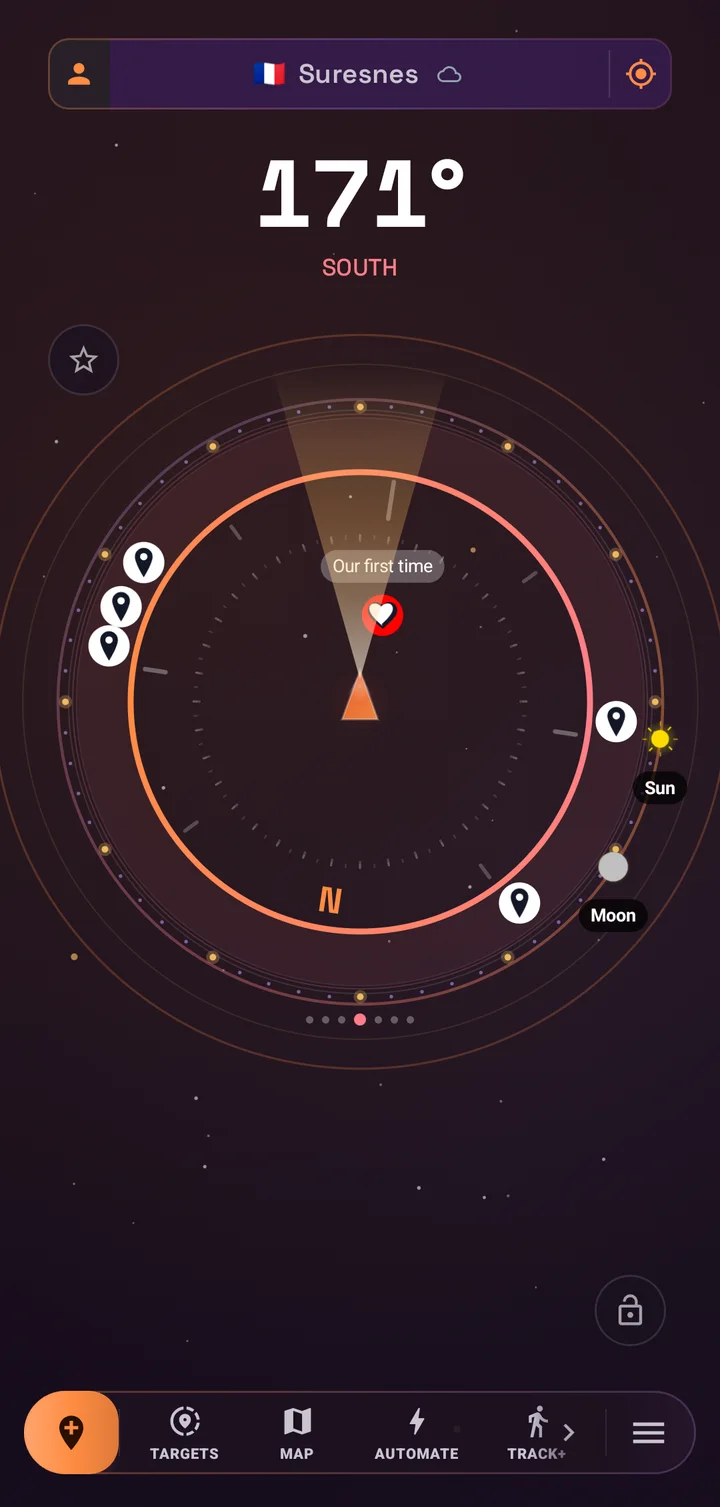
The old cold navy interface is gone. SIMT now lives in warm-tinted deep space: aubergine voids, solar-ember orange, nebula rose, cosmic violet, and starlight gold, inspired by Orion nebula photography rather than a blue sci-fi HUD. Every screen sits on a shared starfield background, and that starfield is not decoration. It counter-rotates with your compass azimuth, so physically turning your body visibly shifts the cosmos behind the UI. Targets read as celestial bodies orbiting you.
- New color system: a dark Deep Space theme by default, a warm Daylight Nebula light theme, and the astronomy red night mode preserved exactly for dark adaptation.
- New typography: Space Grotesk for display text and numeric readouts, with tabular numerals so heading and distance values never jitter while animating.
- Canopy glass surfaces: translucent warm panels with gradient borders, and elevation expressed by glow instead of shadow.
- Redesigned launcher icons to match the new Cosmos identity.
- Adaptive layouts: two-pane target browsing on tablets, a split compass layout in landscape, and tabletop support on flip devices.
The redesign was built with a hard rule: every device stays smooth. Motion is tiered by device performance. High-end phones get parallax, nebula drift, twinkling stars, and staggered entrances. Mid-range devices get parallax and entrances without infinite animations. Low-end devices get a static cached starfield with zero animation loops. The starfield itself is pre-rendered once and reused every frame, so there is no per-frame particle math anywhere in the app.
Automations: SIMT captures targets while you live
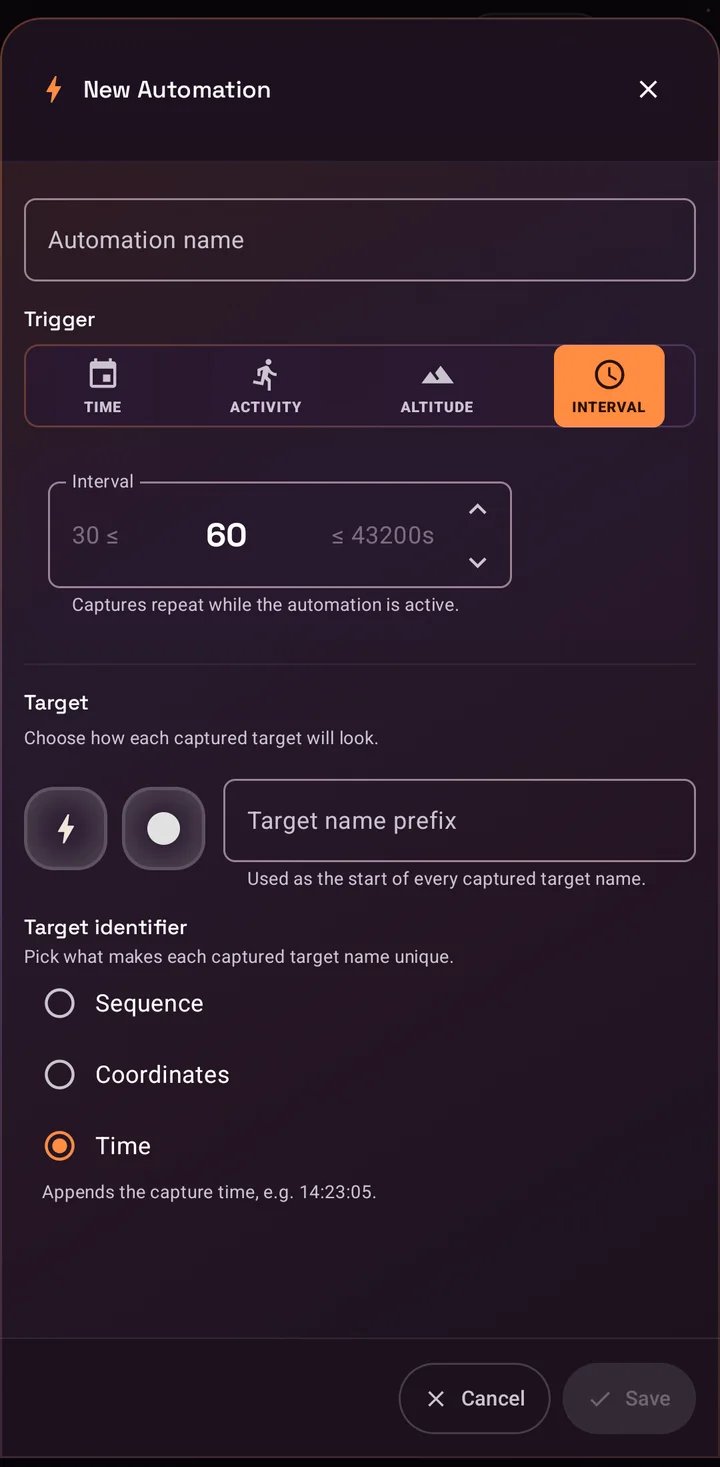
Automations are the biggest new capability in SIMT 2. Instead of opening the app to save a location, you define a rule once and SIMT captures GPS targets for you automatically when the rule fires. Each automation has a name, a trigger, and a target template with a name prefix, icon, and color, plus a unique suffix style based on time, sequence number, or coordinates so every captured target stays distinguishable.
- Interval trigger: capture a target every N seconds to hours, useful for breadcrumb trails on long trips.
- Altitude trigger: capture a target every N meters climbed or descended, powered by the barometer, ideal for hikes and ascents.
- Time trigger: capture once per day at a chosen time on the weekdays you select.
- Activity trigger: capture when your movement changes, for example from driving to still, with selectable from and to states across still, walking, running, driving, and cycling.
Activity automations can also auto-enable themselves while a chosen activity is in progress, so a rule can wake up when you start driving even if you left it switched off. A ready-made Parking automation ships with the app: it captures a target the moment you stop driving, so finding your car later becomes a one-tap job on the compass or the map.
Every captured target is labeled with the automation that created it and the trigger that fired, and you can give all automation captures a dedicated tag. From the Automate screen you can review captured targets per rule, delete them in one action, or clear everything. Automations run on-device, work offline, and are free for everyone.
Keep reading The Parking automation solves one classic headache hands-free — here is the full guide to finding your car in GPS-denied underground parking.Find Your Car Underground Without GPS If GPS keeps failing in a parking garage, SIMT Track+ gives you a practical way to recover your route, keep orientation, and find your car underground without depending on a stable signal.Gift views: Lumina and Minimap
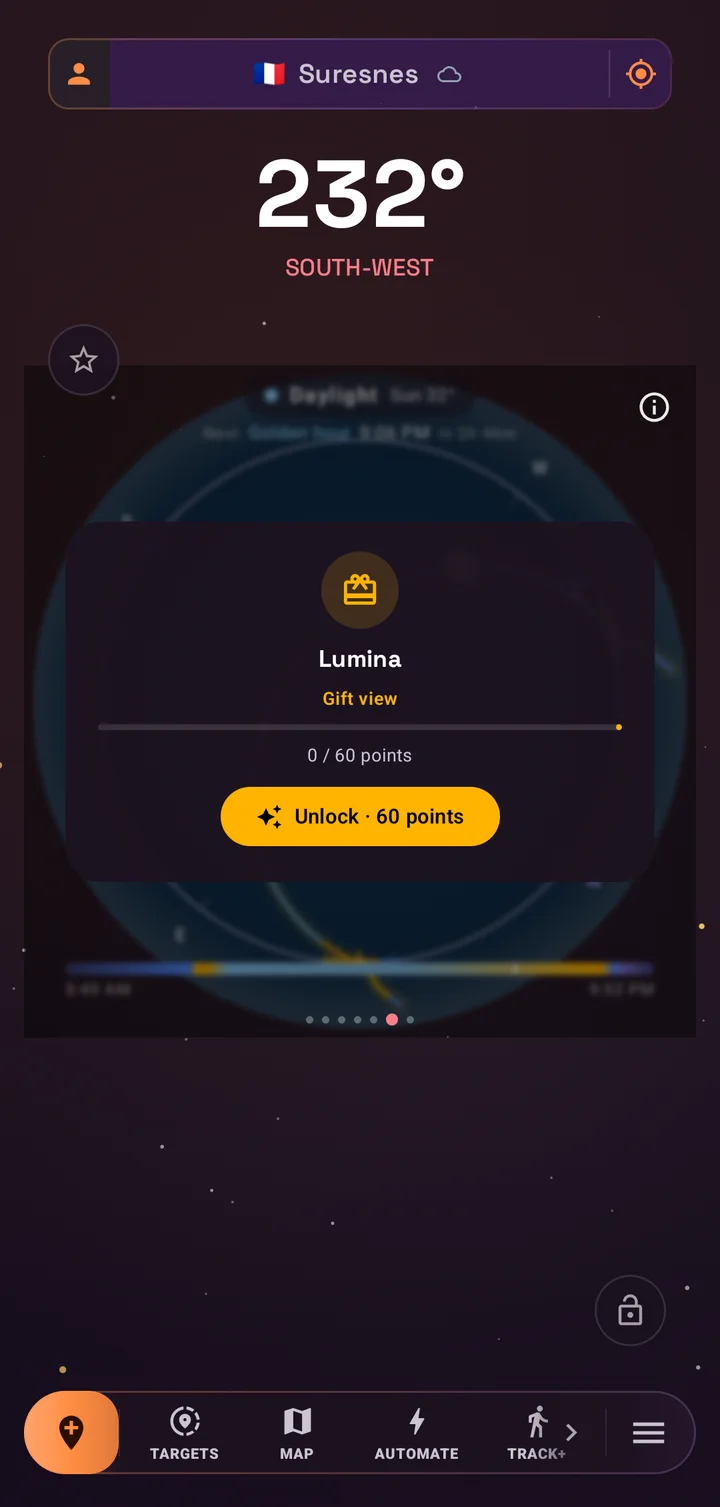
The compass gains two new premium views, and they are not sold for money. They are gifts, unlocked with Support Points that recognize your contributions to the project. You earn points by rating the app, signing in, following SIMT on Instagram, watching an occasional ad, or sending a donation, then redeem them in the Gifts dialog on the Support SIMT screen.
- Lumina view: the photographer's light compass. It draws the sun path across the dial with golden hour and blue hour windows and a live cast-shadow indicator, so you can plan shots and read the light at a glance. It also puts the current moon at your fingertips.
- Minimap view: a heading-up radar map that rotates around you, with cardinal hints and nearby targets rendered as blips, made for quick situational awareness and location games.
Locked views appear in the compass view pager with a Gift view label, a preview behind a soft blur, and a live progress readout showing how many points you have versus how many you need, so the path to unlocking them is always visible.
Bulk actions: manage whole groups of targets at once
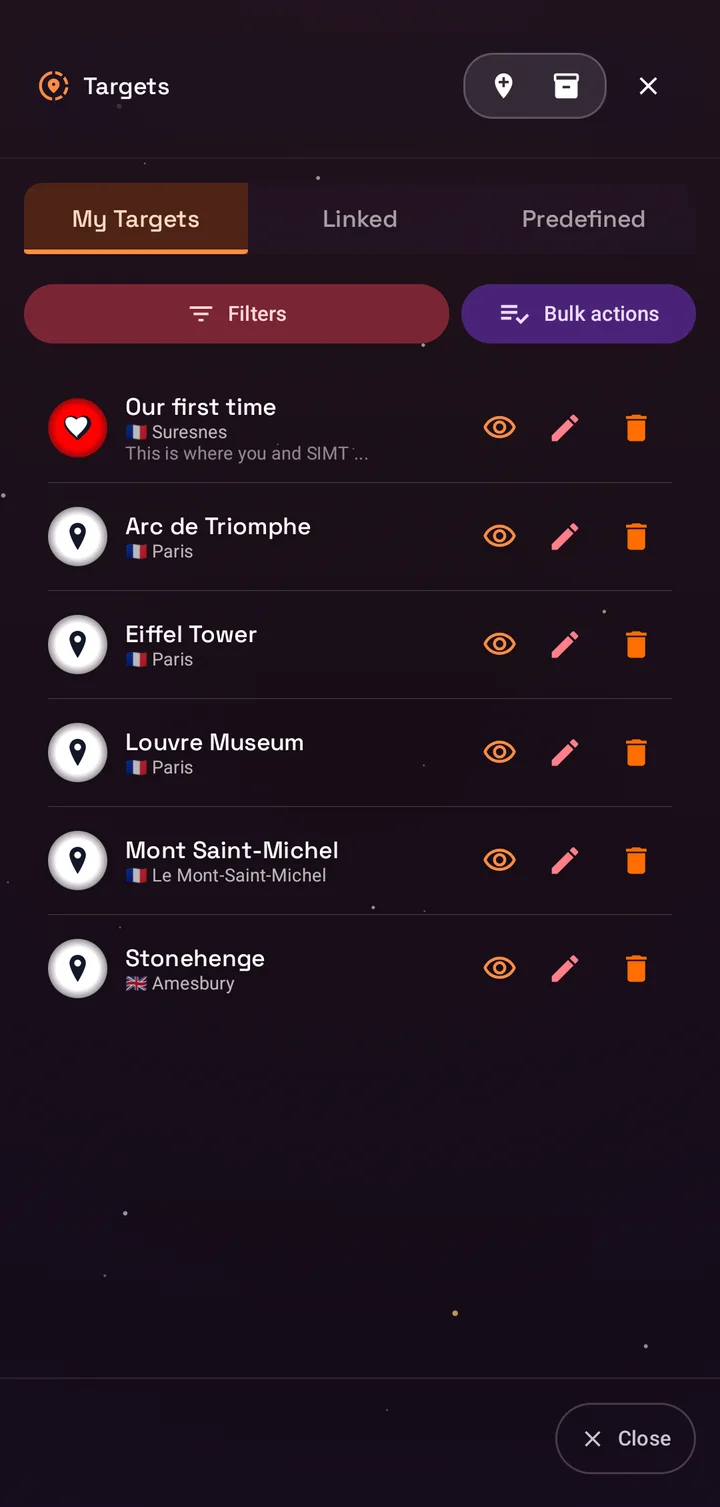
Target lists grow fast, especially once Automations start capturing for you. SIMT now adds a Selection mode to My Targets: tap the new Bulk actions button above the list to enter it, then tick any targets you want, across any groups, and the button live-counts your selection so you always know how many will be affected. Long-pressing a group header still selects every target inside it in one move.
- Show or hide every selected target on the compass at once.
- Add or remove favorites in bulk.
- Disable alerts across the selection.
- Remove a tag from every selected target.
- Archive the selection out of your active list.
- Delete everything you ticked, with a clear destructive confirmation.
Actions that would do nothing are disabled automatically, so if every target in a group is already a favorite, the favorite action steps aside. It is a small touch that keeps bulk management predictable.
Target archiving: declutter without deleting
Archiving fills the gap between hiding a target and deleting it forever. When you archive targets, SIMT moves them out of your active list and stores a compressed, lossless snapshot of every detail, including images. Archived targets disappear from the compass and from your day-to-day lists, but nothing is lost.
- Archives are grouped into batches by date, so a season of trip targets or a month of automation captures stays together.
- Any batch can be restored with one action, and restored targets come back exactly as they were, keeping their identity so links and automations stay coherent.
- Batches you truly no longer need can be deleted permanently from the archive dialog.
- Cleanup tools can include archived targets when you want a full reset.
Moon phases, day by day
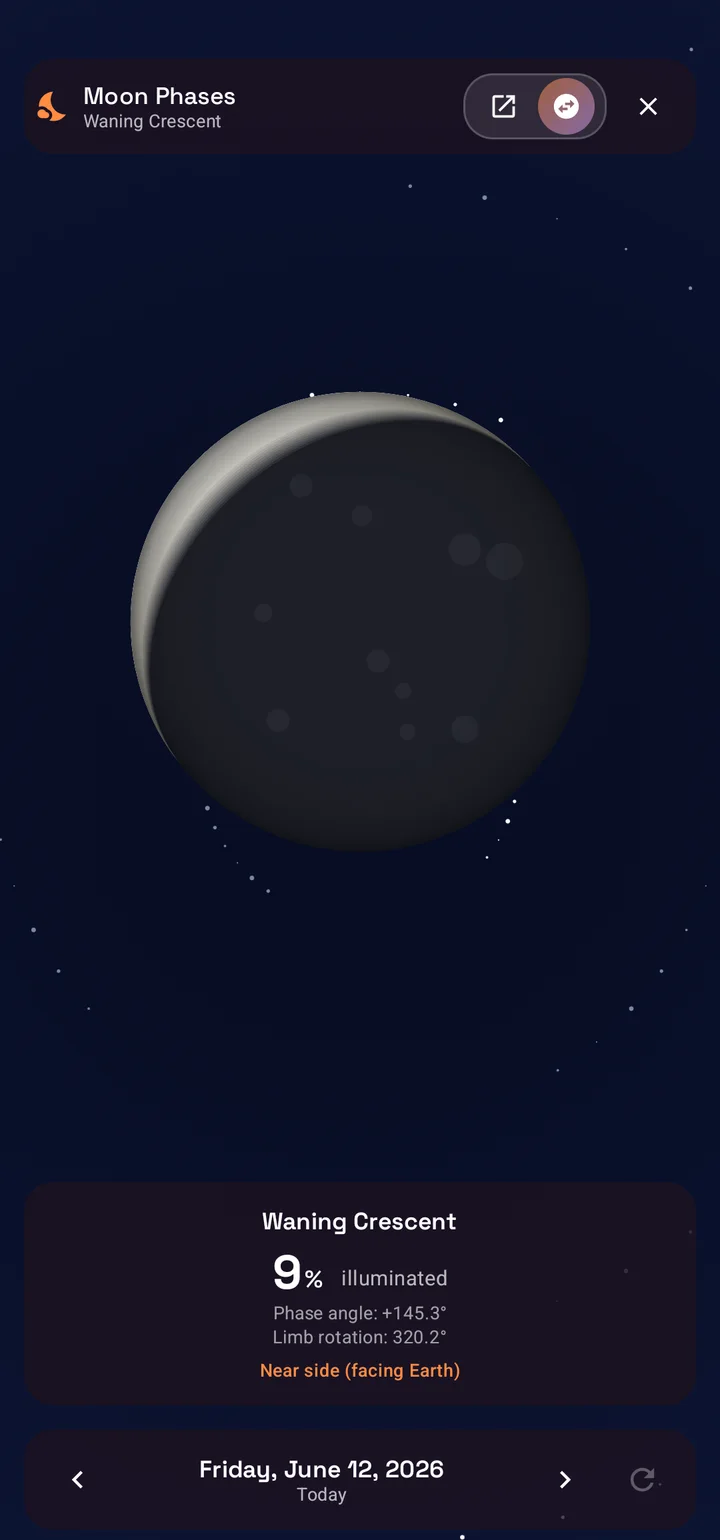
The sky tools gain a dedicated Moon Phases screen: a large, realistically rendered moon with the current phase name, illumination percentage, and phase angle, oriented the way the moon actually appears from your location. A day scrubber lets you step to the previous or next day, jump back to today, or swipe through the lunar cycle to plan around full moons and new moons.
- All phases are covered, from waxing crescent through full moon to waning crescent.
- A near side and far side toggle flips the view to the hidden face of the moon.
- Everything is computed on-device, so the screen works fully offline.
- You can reach it from the toolbar, from the moon in the Lumina view, from the Orrery, or from any Moon target's sky details.
Photographers can pair the Moon Phases screen with Lumina to plan moonlit shoots, and astronomers get a quick phase calendar without leaving the app they already navigate with.
Eclipse forecasts in your Sun and Moon targets
The Sun and the Moon are already targets you can open in SIMT, with live position, distance, and rise and set times. SIMT 2 adds the headline event for each: the next eclipse.
- Open the Sun and you see the next solar eclipse; open the Moon and you see the next lunar eclipse, each labeled with its kind, from a dramatic total or annular solar eclipse to a partial or subtle penumbral lunar one.
- Every forecast carries the date and time of greatest eclipse, so you know exactly when to look up, or when to start planning a trip toward the path of totality.
- Like the rest of SIMT's astronomy, the calculation runs entirely on your device, so the next eclipse is waiting whether or not you have a signal.
It turns two of the sky's most familiar objects into a quiet countdown to the next time they put on a show.
Keep reading There is a spectacular one already on the calendar — the total solar eclipse of August 12, 2026. Here is where, when, and how to catch it.The August 12, 2026 Total Solar Eclipse: Where, When, and How to See It (Offline) For a couple of minutes on August 12, 2026, the Moon slides dead-centre across the Sun and turns afternoon into an eerie dusk — the first total solar eclipse to reach mainland Europe since 1999. Here is where and when it happens, and how SIMT tells you the exact time and direction to look from your own backyard, with no internet at all.The Orrery looks down: a new top view of the solar system
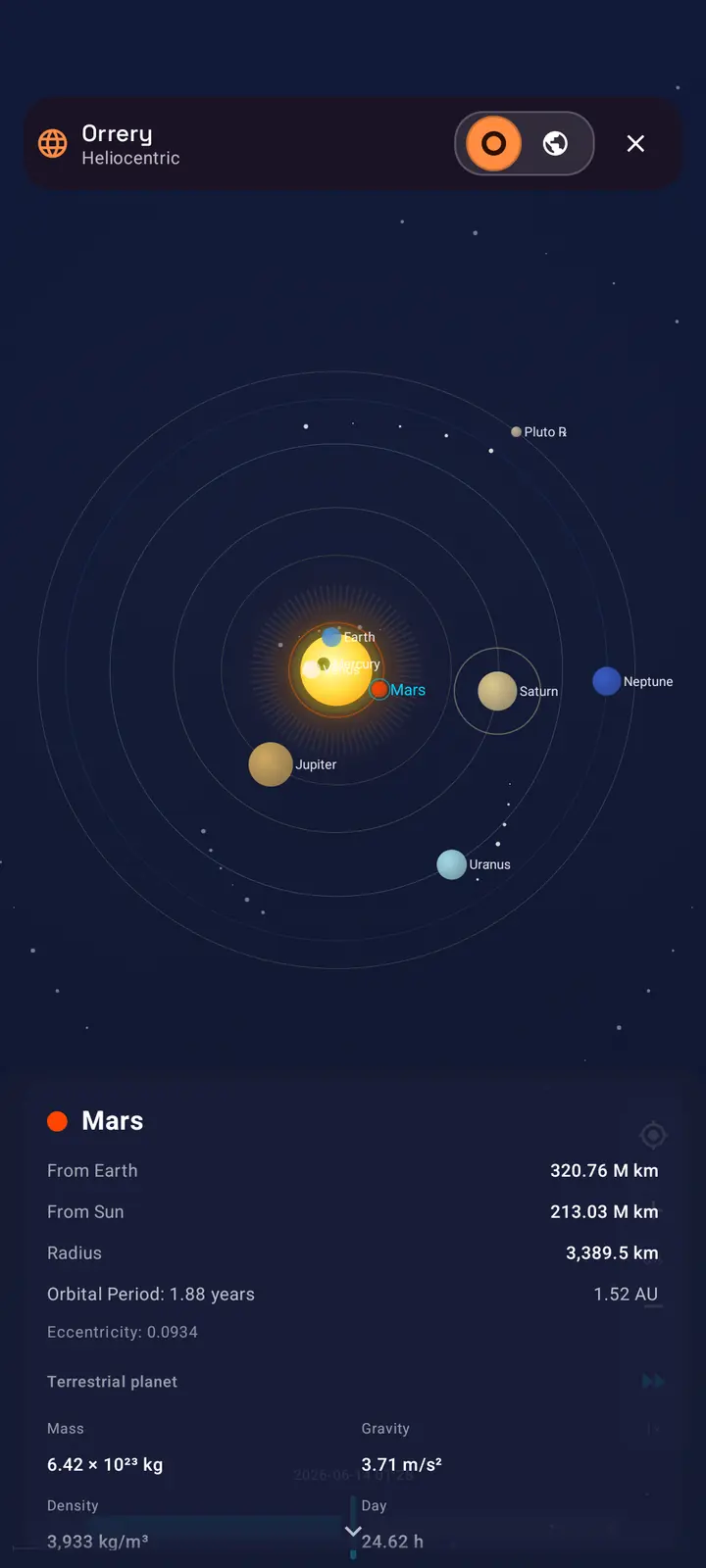
The interactive Orrery has always shown the solar system from a gentle angle, with planets riding tilted orbits that recede toward the horizon. SIMT 2 adds a second perspective. A new Top view lifts the camera straight overhead and looks down on the whole system at once, flattening the scene into a clean, map-like plane where every planet's orbit reads as a true ring around the center.
- Switch between the angled Side view and the overhead Top view at any time; the camera glides smoothly between the two.
- Top view works in both Heliocentric and Geocentric modes, so you can look down on the Sun's family or on the sky as it wraps around Earth.
- Every orbit ring stays visible from above, making orbital spacing, conjunctions, and the relative scale of the planets far easier to read at a glance.
- Pair it with the time scrubber to watch the planets sweep around their rings like hands on a clock.
It is the same offline, on-device Orrery, now with a planetarium-style overhead angle that turns the solar system into something you read like a chart.
Keep reading The Orrery is a full time machine — here is how to scrub it through eclipses, conjunctions, and rare planetary alignments.What Did the Sky Look Like the Night You Were Born? Time-Travel the Solar System with SIMT's Orrery Ever wondered exactly where the planets were the night you were born, or where they will be during the next total eclipse? SIMT's Orrery puts the whole solar system in your hand and lets you drag time backward and forward to find out, entirely offline.Satellites stay current: refresh orbit data from the cloud
Satellite targets, added from their TLE, slowly drift out of date as orbits decay and get nudged. A months-old element set quietly pulls the predicted pass away from the real one. SIMT 2 keeps them honest.
- From a satellite's details, refresh its orbit data and SIMT fetches the latest TLE straight from the cloud, matched by the satellite's catalog number. No hunting down and pasting a fresh element set by hand.
- The fetched elements are validated and saved in place, so the compass bearing, the rise and set times, and any pass alerts immediately follow the up-to-date orbit.
- It is the one part of a satellite target that benefits from a connection. Everything else, including the position math itself, still runs offline once the data is current.
Add a satellite once, refresh it before an important pass, and your prediction stays as current as the catalog itself.
Keep reading New to tracking orbits? Here is the full guide to aiming a dish and catching the ISS with a satellite target.How to Track Satellites with SIMT: Aim a Dish, Spot the ISS, and More From aiming a satellite dish to catching the ISS overhead, SIMT turns any satellite into a direction you can actually point at. Feed it a TLE and it computes the live azimuth, elevation, and range on your device, then guides you there with the compass and Iris AR, even with no signal.Seven UI roles: the app arranges itself around you
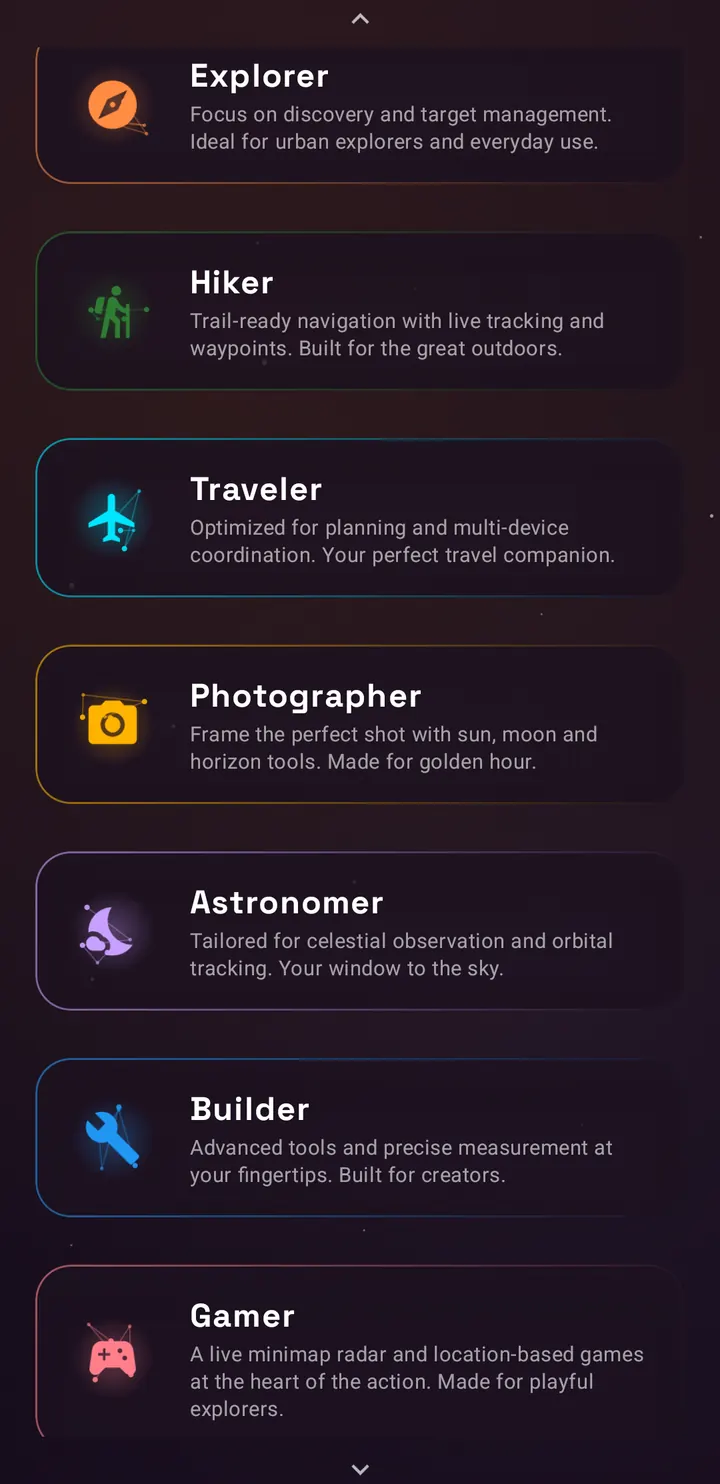
SIMT packs a lot of tools, and not everyone needs the same ones up front. UI roles solve this. During onboarding, and at any time from your profile on the compass, you choose the role that matches how you use SIMT. Each role rearranges the toolbar, promotes different tools, and selects the compass views that fit your work.
- Explorer: discovery and target management first, with the layered dial as the home view.
- Hiker: trail navigation and live tracking, leading with the proximity star view and quick access to tracking and GNSS tools.
- Traveler: planning and multi-device workflows, with maps, images, and games close at hand.
- Photographer: sun, moon, and horizon tools, pairing the layered dial with the Lumina light compass.
- Astronomer: celestial and orbital work, leading with the horizon string view, the Orrery, and Moon Phases.
- Builder: advanced tools and measurement, with the digital plumb bob front and center.
- Gamer: the Minimap radar and location games take the spotlight.
Hiker, Photographer, and Gamer are new in this release wave, joining the original four. Roles never lock anything away: every tool stays reachable, and you can switch roles or fine-tune your enabled compass views whenever you like.
Connect goes tap-to-connect and fully offline
Connect shares your live location with the people around you over the local network, with no cloud and no account. SIMT 2 makes connecting two devices far faster, and frees Connect from needing a shared network at all.
- NFC tap to link: hold two phones together and they pair on contact. The tap hands over a one-time bootstrap that skips the usual discovery step entirely, so there is no waiting for the other device to appear in a list.
- Because that handover travels across the few-centimeter NFC field, each device also confirms the other's security fingerprint at the moment of the tap. That closes the trust-on-first-use gap and makes a man-in-the-middle on a shared network far harder to pull off.
- Tap to link needs only the install-time NFC permission, with no extra runtime prompt, and the option simply hides itself on phones without NFC hardware.
- Wi-Fi Direct offline mode: link devices straight to each other with no router, no access point, and no internet. SIMT forms its own peer-to-peer Wi-Fi group on the spot, so a dive boat, a remote trailhead, or a stadium with saturated Wi-Fi is no longer a dead zone for sharing.
- Offline links carry the same end-to-end mutual-TLS encryption as every other Connect connection, and Wi-Fi Direct peers are clearly badged so you always know which transport a link is riding on.
A more stable GNSS engine
SIMT's raw GNSS engine processes measurements from GPS, GLONASS, Galileo, BeiDou, QZSS, and NavIC directly on your phone, and can reach sub-meter accuracy once converged, with optional PPP corrections over SSR streams and RTK corrections from NTRIP base stations. In this release wave the engine received its deepest stability pass yet, with dozens of correctness fixes landed after a full engine review.
- Navigation message parsing was hardened for every constellation, including GPS and QZSS bit-field handling, GLONASS timescale and string handling, Galileo page assembly, and a rewritten BeiDou decoder.
- GLONASS measurements are now formed in their own native timescale, eliminating a class of subtle ranging errors.
- Carrier smoothing and the inter-epoch Kalman filter gained per-signal tracking, proper reset handling, and a stricter gate that rejects bad fixes instead of adopting them.
- SSR correction handling is now gated on ephemeris consistency and uses the correct orbital frame, making PPP behavior more trustworthy.
- NTRIP streaming was fixed end to end, including chunked transfer handling, and the capture pipeline is now lifecycle-bound and cancellation-safe, so long background sessions no longer leak or stall.
The result is an engine that converges more reliably, holds its solution longer, and behaves predictably across constellations and correction modes. The GNSS screen continues to expose live diagnostics and a map view for anyone who wants to watch the solver work.
Keep reading Want to understand what that engine actually does? Here is how SIMT builds a positioning fix from raw satellite signals, step by step.How Android Raw GNSS Works — and Why SIMT Builds Its Own Positioning Engine Your phone receives timing signals from dozens of satellites every second. Most apps never touch that data. SIMT does — and it builds a full positioning engine from raw measurements, carrier phase, broadcast ephemeris, and atmospheric models to push accuracy far beyond what standard GPS gives you.Better performance on every device
Performance work in SIMT 2 targeted the two places you feel speed most: app startup and everyday scrolling. Cold start was rebuilt around Baseline Profiles and a leaner launch path, with blocking reads removed from the critical path, services initialized lazily, and heavyweight work deferred until after the first frame.
- Baseline Profiles ship with the app, so critical startup code is pre-compiled on install.
- Six legacy animated backgrounds were replaced by the single tiered Cosmos background, which reduces overdraw across the whole app.
- Starfields are rendered once and reused, never recomputed per frame, and all infinite animations pause when a screen is not visible.
- On low-end devices, expensive layers simply do not exist: static backgrounds, instant navigation transitions, and zero animation loops.
- Target lists got snappier through smaller page sizes and a new database index on target names.
Bug fixes and more across the toolkit
Beyond the headline features, SIMT 2 carried a long tail of fixes and smaller improvements across the toolkit.
- Connect local sharing is more dependable: service lifecycle and socket management were reworked, peer handling was centralized, and pulse and disconnect events now raise clear alert notifications.
- The map location picker no longer fights you while dragging, and target markers render more accurately on the map.
- Track+ now records altitude along your path, adding a vertical dimension to recovery and review.
- Shared target links can now carry opening and closing hours, so time-bound places survive the trip between devices.
- Billing moved to the latest Play Billing library with cleaner error handling, and a new Instagram follow reward joined the Support Points options.
- Database migrations gained extra validation, and target visibility toggles were fixed for anonymous targets.
Get SIMT 2
SIMT 2 is a free update, rolling out now on Google Play for Android phones and Wear OS. Everything described here ships in the standard app: no subscription, no account requirement, and your targets, images, and settings stay on your device by default.
Download SIMTGet SIMT 2 on Google Play and explore the Cosmos redesign, Automations, gift views, moon phases, and the rest of what SIMT 2 brings.If you are new to SIMT, start with the role picker: choose how you explore, and the app will arrange its tools around you. And if SIMT earns a place on your home screen, rating the app or following along on Instagram both feed Support Points straight back into your gift views.
Questions answered in this guide
Is SIMT 2 a free update?
Yes. SIMT 2 is free on Google Play. The Lumina and Minimap gift views are unlocked with Support Points earned by rating the app, signing in, following on Instagram, watching ads, or donating, never by a mandatory payment.
Do Automations need an internet connection?
No. Automations run entirely on-device using GPS, the barometer, the clock, and activity recognition. Triggers fire and targets are captured even when you are offline.
What happens to images when I archive targets?
Archiving stores a compressed, lossless snapshot of every target detail, including images. Restoring a batch brings targets back exactly as they were, with their identity preserved.
How is archiving different from hiding a target?
Hiding keeps a target in your active list but removes it from the compass. Archiving moves it out of the active list entirely into a restorable snapshot, which keeps long-lived target collections fast and tidy.
Will the Cosmos redesign slow down my older phone?
No. All Cosmos motion is tiered by device performance. Low-end devices get a static, cached starfield with no animation loops at all, and the redesign actually reduced total background rendering cost across the app.
Do UI roles lock me out of features?
No. A role only rearranges the toolbar and selects default compass views for your workflow. Every tool remains accessible from any role, and you can switch roles or customize views at any time.
What changed in the GNSS engine in SIMT 2?
A deep stability pass fixed dozens of issues across navigation message parsing for all six constellations, carrier smoothing, Kalman filter gating, SSR correction handling, and NTRIP streaming, making convergence more reliable in PPP and RTK modes.
Can Connect share my location without Wi-Fi or internet?
Yes. Connect adds a Wi-Fi Direct offline mode that forms a private peer-to-peer connection between devices with no router, no access point, and no internet. On a shared network, you can also hold two phones together to link them instantly over NFC, which skips discovery entirely and verifies each device's security fingerprint at the moment of the tap. Every link stays end-to-end encrypted with mutual TLS and never touches a server.
What is the new top view in the Orrery?
The Orrery can now switch from its angled side view to an overhead Top view that looks straight down on the solar system, drawing every planet's orbit as a ring. It works in both heliocentric and geocentric modes and, like the rest of the Orrery, runs entirely offline on your device.
Where do I see the next eclipse in SIMT?
Open the Sun target for the next solar eclipse, or the Moon target for the next lunar eclipse. SIMT shows the eclipse kind (total, annular, or partial for the Sun; total, partial, or penumbral for the Moon) along with the date and time of greatest eclipse, all computed on-device so it works offline.
How do I keep a satellite's orbit data up to date?
Open the satellite target and refresh its orbit data. SIMT fetches the latest TLE from the cloud by the satellite's catalog number and saves it in place, so its compass bearing, rise and set times, and pass alerts stay accurate. It is the only part of a satellite target that uses a connection; the position math itself still runs offline.
More from SIMT Blog
Release update
What's New in SIMT 1: The Constellation Update
The Constellation Update is SIMT's biggest release wave to date: write on your own maps, command positioning satellites, fly through a living solar system, play GeoQuest, link multiple devices, and back everything up to Google Drive — all from one compass app.
Beta release
Introducing SIMT: The First Light Beta
Before the Constellation and Cosmos updates, there was First Light: the very first public SIMT beta. Here is the foundation it laid, an offline compass and a whole toolkit for capturing, measuring, and sharing the places that matter, with every byte kept on your device.