
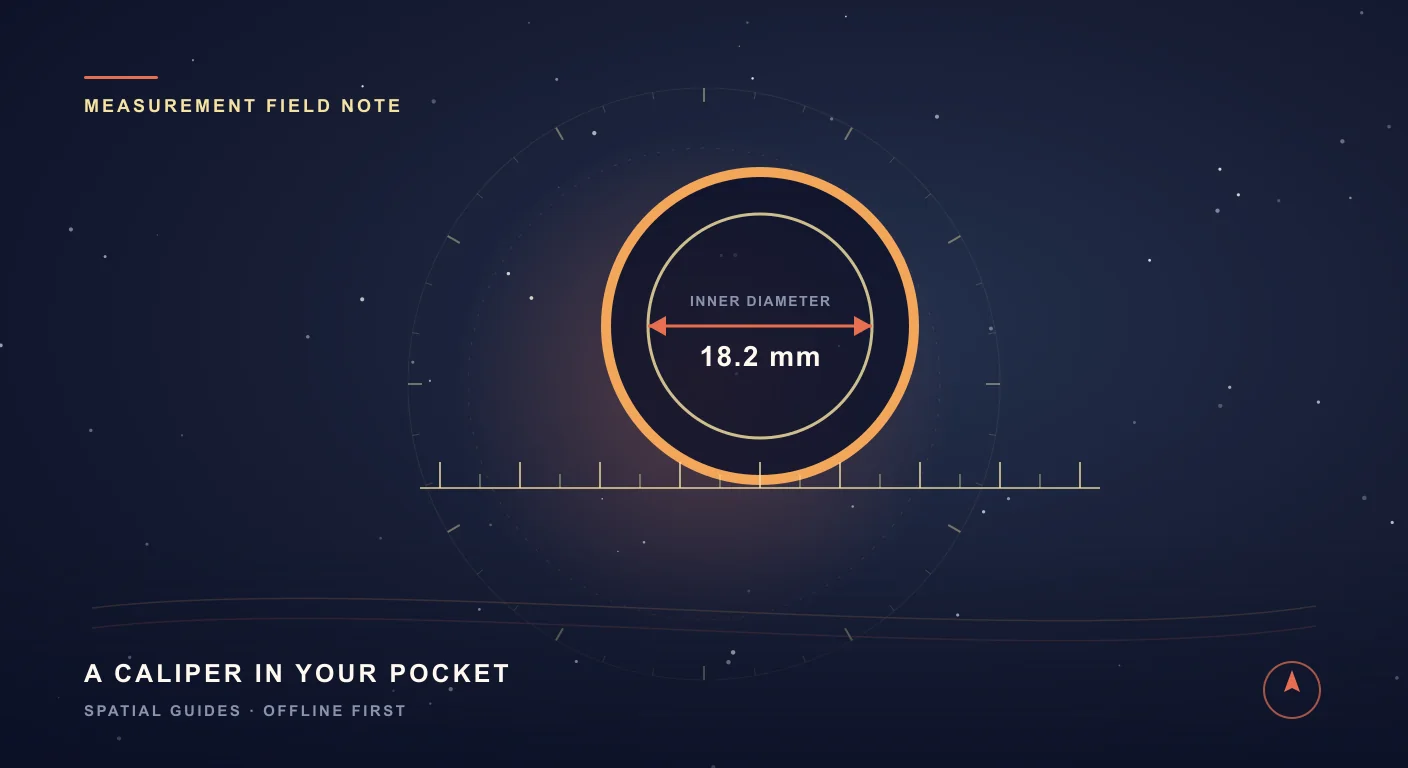
The secret-ring problem (and the thirty-second fix)
Here is the classic bind. You want to surprise someone with a ring. The whole point is that they don't know. So you can't exactly slide a sizer onto their finger over dinner. But somewhere in a drawer is a ring they already wear — and a ring is just a circle with a very specific diameter. If you can measure that diameter accurately, you can look up the size. The trouble is that a ruler app that doesn't know your screen's true scale will be off by millimetres, and with rings, a millimetre is a whole size.
SIMT solves both halves. It turns the screen itself into the measuring surface — gold rulers down two edges, a black canvas you draw on with your fingers — and it lets you calibrate that surface so a centimetre on screen is a real centimetre in the world. That combination is what makes measuring a ring on a phone actually trustworthy.
Calibrate first — this is the trick that makes it accurate
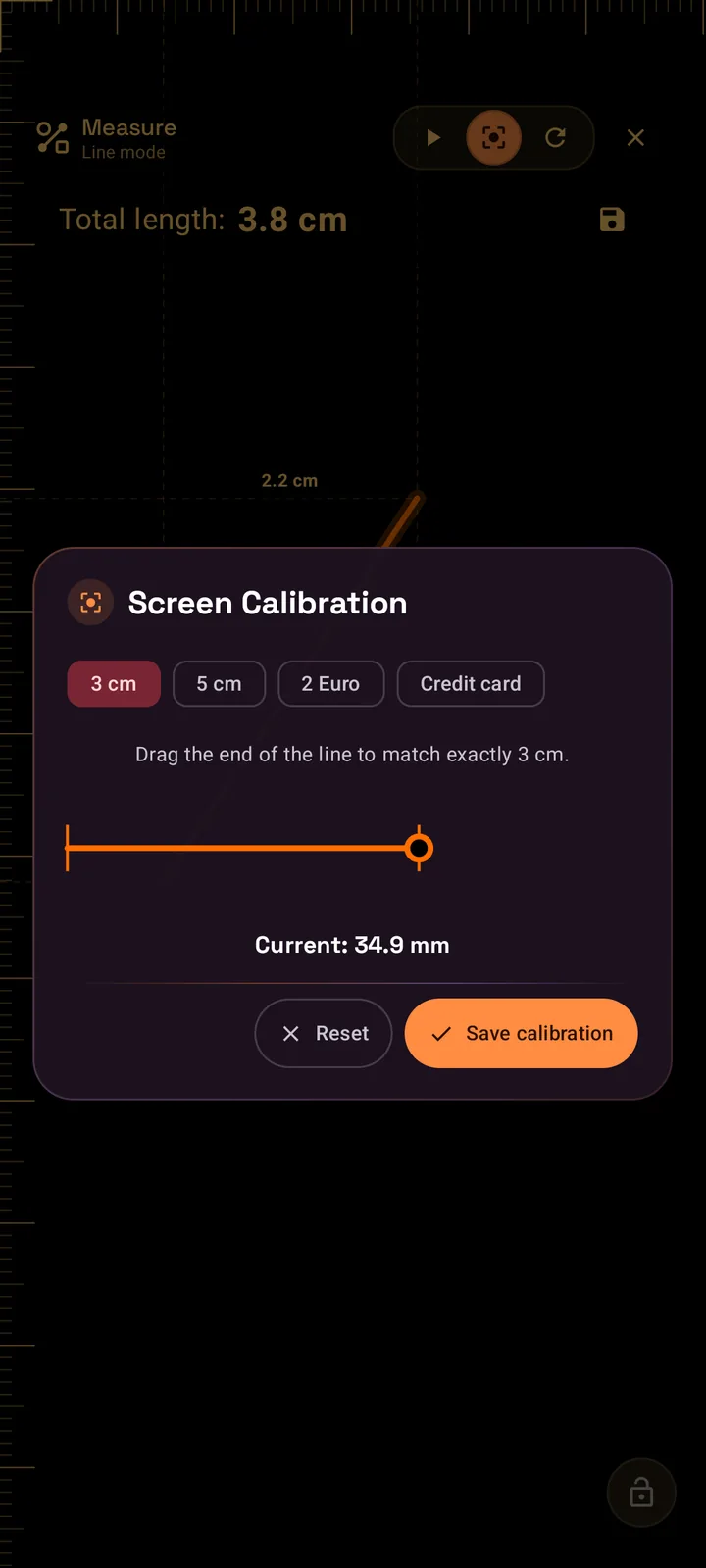
Every phone reports its own screen density, and not all of them report it honestly. So before you measure anything that matters, you calibrate — once. Tap the calibrate tool and SIMT shows a single line with a draggable end and a short menu of reference objects you almost certainly have within arm's reach.
- A credit card — every ISO card is exactly 53.98 mm tall (2.13 in). Lay one on the screen and drag the line to its edge.
- A 2 Euro coin — 25.75 mm across, a perfect round reference if a card isn't handy.
- A clean ruler mark — 3 cm or 5 cm in metric, 1 in or 2 in in imperial, if you have a physical ruler to check against.
Drag the on-screen line until it matches the real object exactly, hit save, and SIMT stores a calibration factor it applies to every measurement from then on. The little calibrate icon stays lit to remind you the screen is dialled in. This is the difference between a fun gimmick and a number you'd actually trust at a jeweller's counter.
Caliper mode: a ring in three seconds
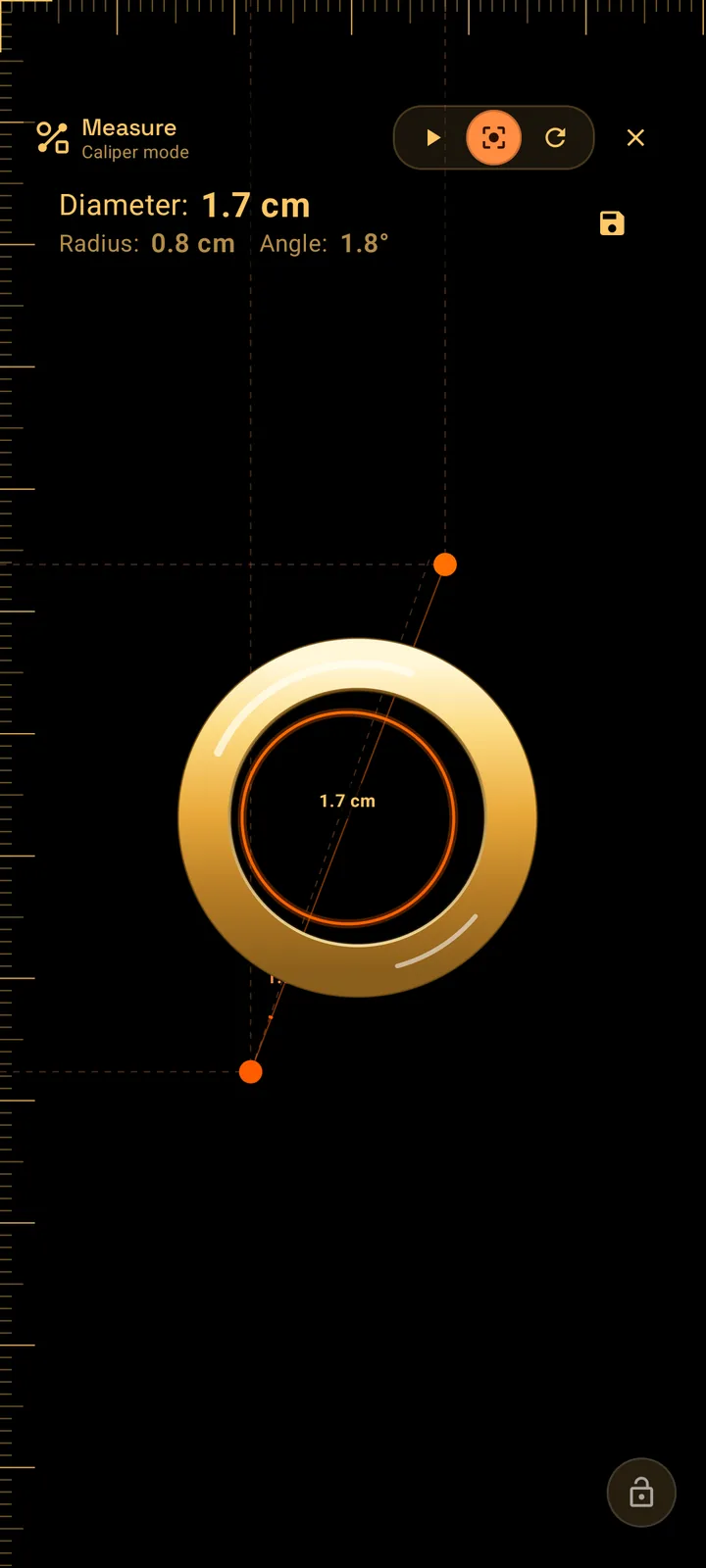
Caliper mode is the star of the ring trick. Touch the screen with two fingers and SIMT draws a caliper between them, reading out the distance as a diameter, the half of it as a radius, and even the angle if you rotate the line. Lay the borrowed ring flat on the glass, then set your two fingertips to the inside edges of the band. The readout updates live as you nudge them.
Need it dead-on? Keep your two fingers down and add a third: a third finger fine-tunes the diameter outward or inward by tiny amounts, so you can shrink the caliper to kiss the inner circle of the ring precisely. The readout also shows the angle of the line, so you can keep it square across the ring. Lift your fingers and the measurement freezes on screen. Read the diameter, then match it to a ring-size chart — roughly 16.5 mm is a US 6, about 17.3 mm a US 7, around 18.1 mm a US 8 — and you've sized a ring without its owner ever knowing.
Four ways to measure, not one
Once Measure is open you have far more than a ring tool. The same canvas reads four different gestures, and it switches between them automatically based on how many fingers you use and how you move them.
- Dot mode — tap to drop points. Each dot shows its on-screen coordinates, and the header counts them. Great for marking reference positions or stepping out a pattern.
- Line mode — press and drag to draw a free path at any angle. SIMT reports the total length plus the width and height of its bounding box, so a diagonal line gives you its run and rise too.
- Caliper mode — two fingers for diameter, radius, and angle. The ring tool, but also perfect for bolt heads, beads, dowels, and anything round.
- Polygon mode — put four or more fingers down and SIMT connects them into a shape and computes its area in cm² or in². Map out a rectangle, a triangle, or an irregular footprint in a single touch.
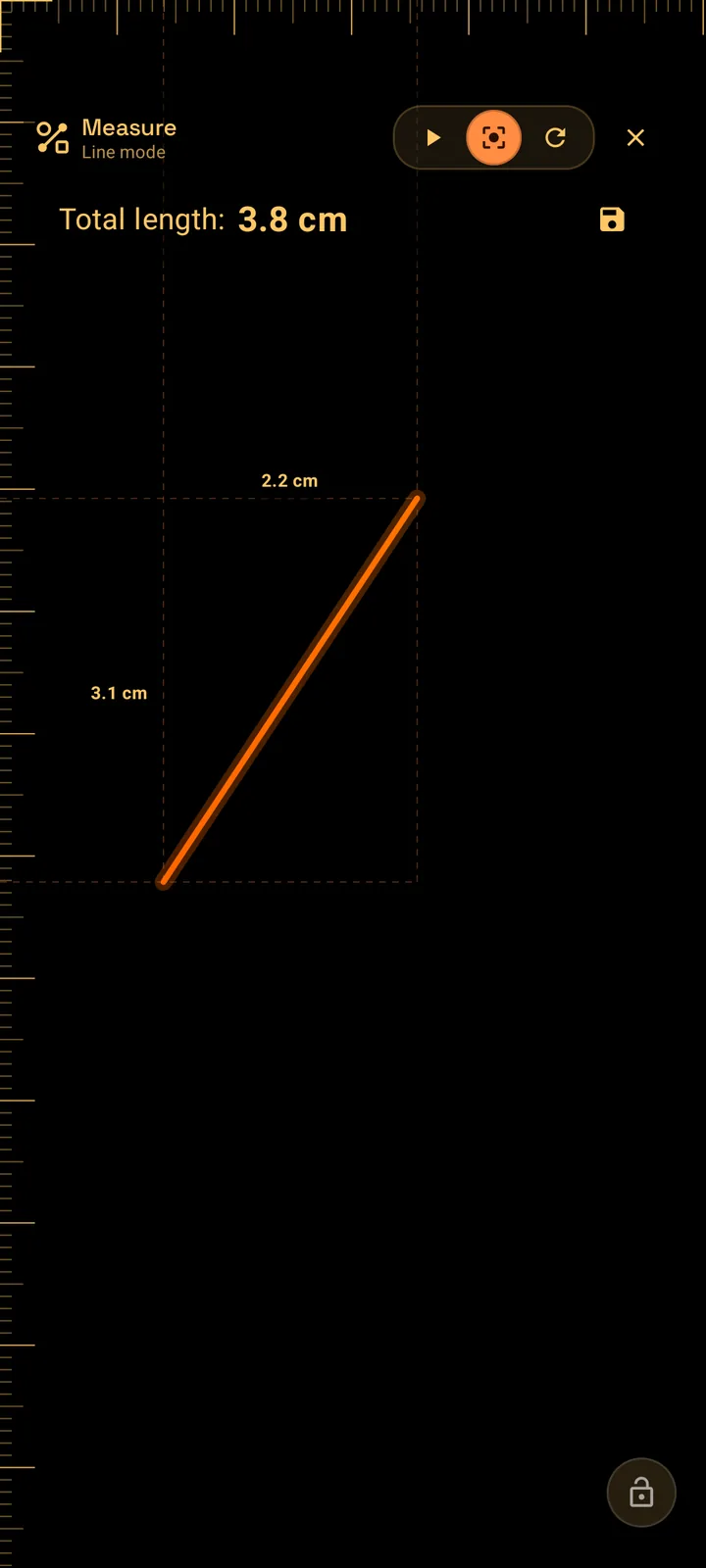
Line mode is quietly clever: because the screen knows its horizontal and vertical density separately, a line drawn at 45° is converted with the correct density along each axis, so the length is right at any angle — not just for tidy horizontal or vertical measurements.
And Polygon mode turns a fistful of fingers into instant area. Drop four or five fingers around the thing you care about — a tile, a label, a sticker, a patch of leather — and the points connect into a shape with its area printed at the top. It is the fastest way to answer 'how big is this surface?' without doing any arithmetic.
Keep reading Measure is only one of SIMT's tools. Here is the case for why planning, tracking, measuring, and sky all belong in one app.Why One App for Planning, Tracking, Measuring, and Sky Exploration Beats Four Separate Apps Most people carry four or five separate apps for navigation, measurement, local sharing, and sky tracking. SIMT combines all of those into one offline-first toolkit, and the integrated experience is better than the sum of the parts.Save it, name it, bring it back
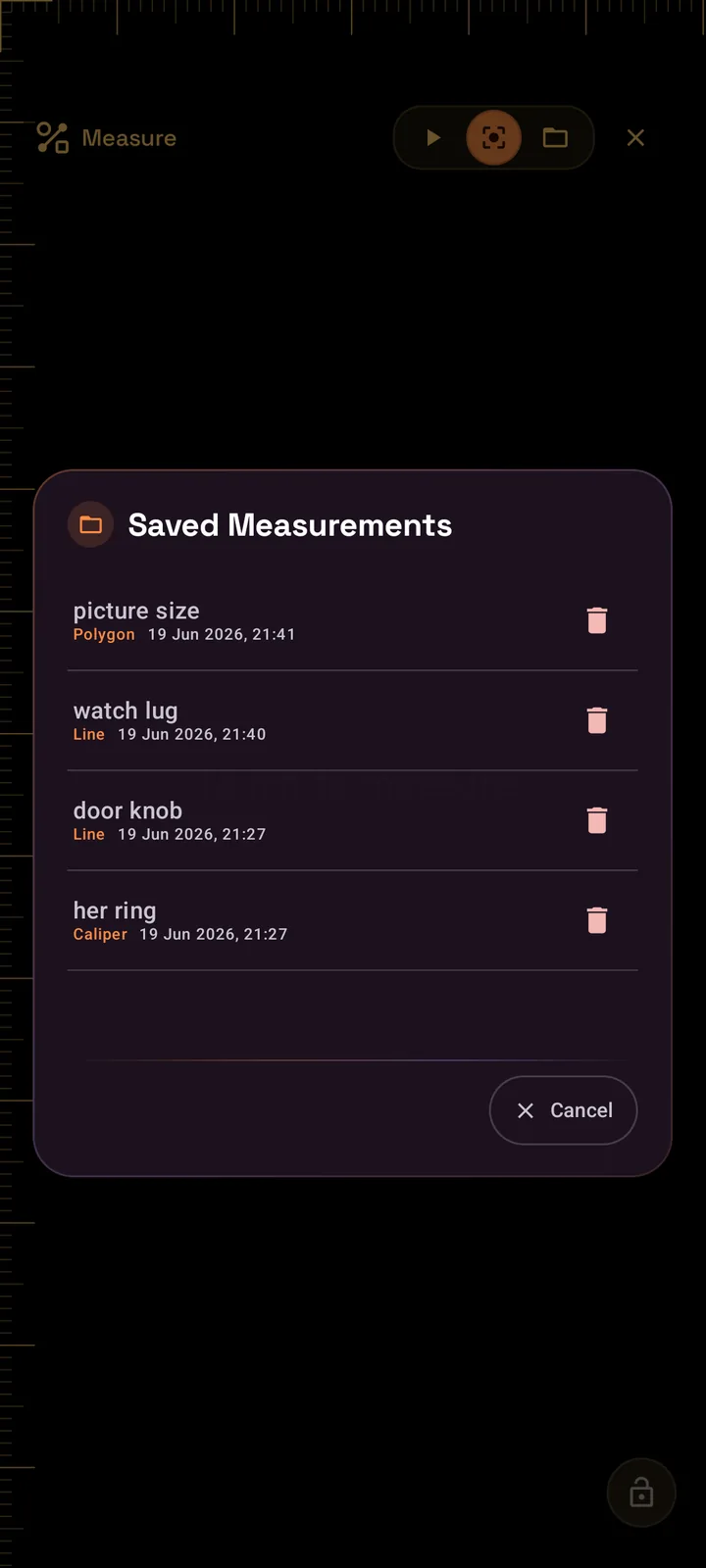
A measurement you can't keep is a measurement you'll have to take again. So SIMT lets you save what's on screen with a name and pull it back later, redrawn exactly as you left it. That borrowed-ring diameter you captured on a Tuesday is still there on Saturday at the jeweller — no re-measuring, no second sneaky drawer raid.
- Name your measurements — "Her ring", "My ring finger", "Watch lug", "Shelf gap" — so the list reads like a personal sizing notebook.
- Keep up to ten on hand, each tagged with its type (Line, Caliper, Points, or Polygon) and the date you took it.
- Load to redraw — tap a saved entry and the exact shape reappears on the calibrated canvas so you can re-read or re-check it.
- Lock to protect — flip the lock so a stray touch can't wipe a measurement while you reposition the phone or grab a chart.
It quietly becomes a habit. The ring size of everyone you buy gifts for, the diameter of the watch you keep meaning to replace a strap on, the width of a frame you want to fit — capture them once, name them, and stop guessing in shops forever.
And because measuring should be fun: the Measure game
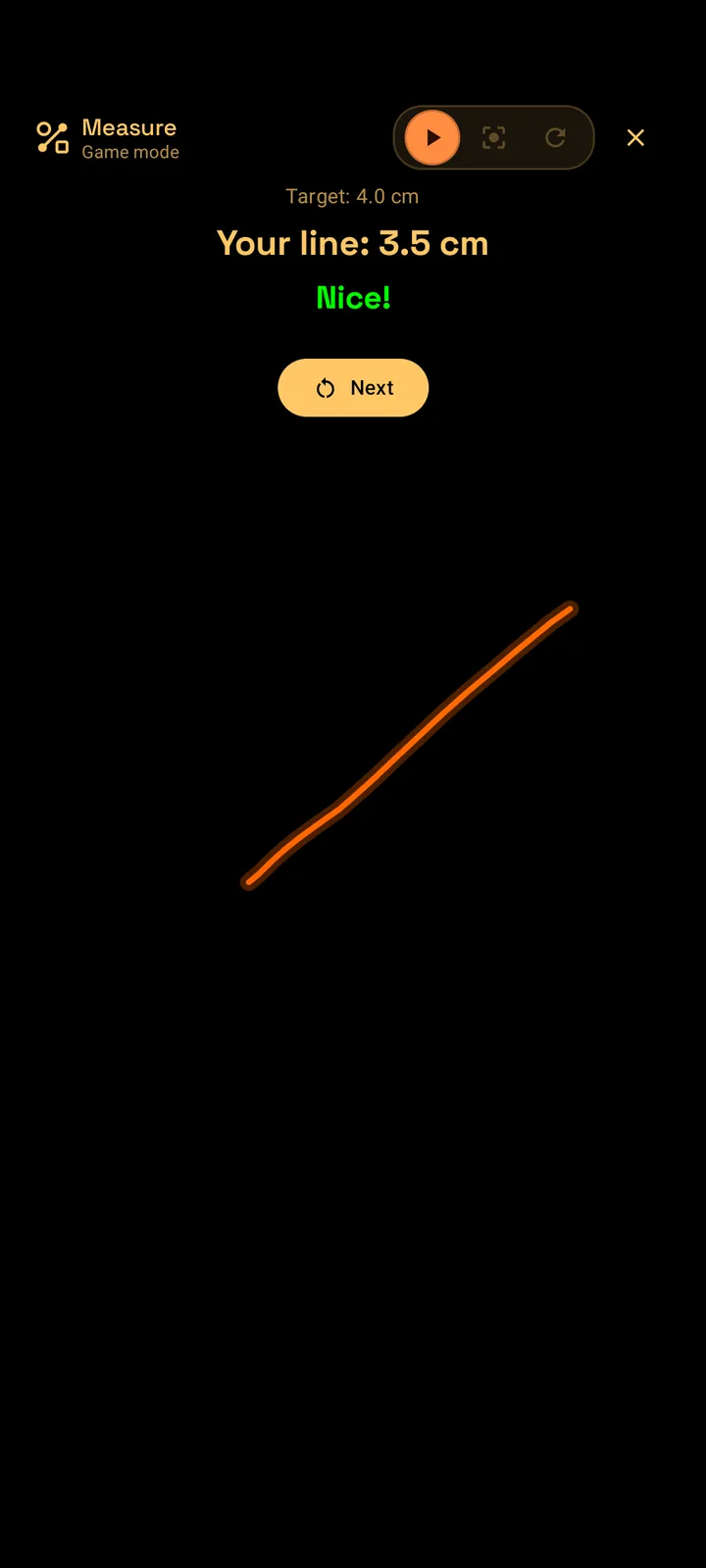
Here's the part nobody expects from a measuring tool. Tucked into Measure is a game — and it is dangerously good at starting arguments between friends. The rules are simple: SIMT gives you a target length, the rulers slide off the screen so you can't cheat, and you draw a line as close to that length as your eye can manage. Then it tells you exactly how far off you were.
- Easy mode gives whole-number targets, so you're guessing a clean 4 cm or 7 cm — forgiving, and a great warm-up.
- Hard mode throws decimals and larger lengths at you, and the tolerance is tiny. Landing a "Perfect!" here is a genuine flex.
- A countdown builds the tension before each round, then the rulers vanish and it's just you and your eye.
- Instant grading shows the target, your line, and the difference — with a green "Nice!" or "Perfect!" when you nail it.
Pass the phone around a table and it becomes weirdly competitive. Everyone thinks they have a good eye for distance; almost nobody does. It's the ideal thing to lose five minutes to in a queue, on a flight, or while you're waiting for the jeweller to come back with your sized ring — and it sharpens the same instinct that made you reach for a measuring app in the first place.
Keep reading If you like SIMT's playful side, its offline GeoGuessr-style game is the natural next thing to lose an afternoon to.The Free, Offline GeoGuessr Alternative That Works on a Plane You are 35,000 feet above the Atlantic. Your flight is six hours long. You have already watched the film and the battery on your AirPods is half dead. And then you remember: GeoGuessr costs money and needs WiFi. Here is the free, offline alternative you did not know you had.Why this works on any phone, with no internet
There's no special hardware here and no connection required. SIMT reads your screen's real pixel density, applies the calibration you set once, and converts what your fingers touch into physical centimetres or inches. The rulers, the caliper, the area math — all of it runs locally on the phone you already have, on a plane, in a basement, anywhere.
Keep reading That same lean, hardware-light philosophy powers Iris — augmented reality on almost any phone, with no ARCore required.Iris: AR on Any Phone, Powered by Math Instead of ARCore Most AR apps lean on ARCore and a certified device list. Iris takes a smarter route: it paints any target onto your live camera with pure mathematics, so augmented reality runs on almost any phone, works offline, and barely touches the battery.A ring is a circle with an exact diameter. Calibrate your screen, lay the ring on it, pinch two fingers — and your phone hands you the number you needed without ever asking the question you couldn't ask.
So the next time you need a ring size and can't tip off the person you're buying for — or you just need to measure a beat, a board, or a bottle cap and don't have a tape handy — your phone is already a calibrated caliper. It just needed the right app.
Get SIMT and turn your screen into a caliperFree, offline, and full of tools you didn't know you were carrying. Measure a ring, then stay for the rest.Questions answered in this guide
Can I really measure a ring size with my phone?
Yes. The reliable method is to measure a ring the person already owns: calibrate your screen once, switch SIMT to Caliper mode, lay the ring flat on the screen, pinch two fingers across its inner edge, and read the diameter. Match that diameter to a standard ring-size chart to get the size.
Do I need the actual ring, or can I measure a finger?
An existing ring gives the most accurate result, because you're measuring a known inner diameter directly. If you don't have one, you can measure the width across the base of the finger as an estimate and compare it to a chart, but treat that as a starting point and consider sizing up slightly.
How accurate is measuring on a screen?
Accuracy depends almost entirely on calibration. Every phone reports its screen density differently, so SIMT lets you calibrate against a known object — a credit card (53.98 mm tall), a 2 Euro coin (25.75 mm), or a ruler mark. Once calibrated, on-screen centimetres match real centimetres, and the saved factor is reused for every measurement.
What can SIMT's Measure tool measure besides rings?
Four modes: Dot mode drops points and shows their coordinates and count; Line mode measures a free path's length at any angle plus its width and height; Caliper mode gives diameter, radius, and angle; and Polygon mode turns four or more fingers into a shape and computes its area in cm² or in².
Does the Measure tool work offline?
Completely. SIMT reads your screen density and does all the conversion and area math on-device, so the rulers, caliper, and game work with no internet connection at all.
Can I save measurements for later?
Yes. You can save up to ten measurements, each with a name, its type, and the date. Load any saved entry to redraw it exactly on the calibrated canvas, and lock the screen so a stray touch can't clear your work.
What is the measuring game?
It's a built-in mini-game where SIMT gives you a target length, hides the rulers, and asks you to draw a line as close to that length as you can by eye. Easy mode uses whole numbers; Hard mode uses tight decimal targets. It grades the difference instantly and is great to pass around with friends.
More from SIMT Blog

Why one app beats four
Why One App for Planning, Tracking, Measuring, and Sky Exploration Beats Four Separate Apps
Most people carry four or five separate apps for navigation, measurement, local sharing, and sky tracking. SIMT combines all of those into one offline-first toolkit, and the integrated experience is better than the sum of the parts.
Travel entertainment
The Free, Offline GeoGuessr Alternative That Works on a Plane
You are 35,000 feet above the Atlantic. Your flight is six hours long. You have already watched the film and the battery on your AirPods is half dead. And then you remember: GeoGuessr costs money and needs WiFi. Here is the free, offline alternative you did not know you had.